The FixYourDocs Hub
The Hub at hub.fixyourdocs.io is the reference endpoint for the
Docs Feedback Protocol. It accepts reports from anyone and
forwards them to a maintainer’s GitHub repository as Issues — but only for
docs that maintainer has verified they own.
Sending a report
Section titled “Sending a report”POST /v1/reports is public and unauthenticated. This is the exact call
every surface makes — SDK, CLI, MCP server, and the AGENTS.md block all
produce it:
curl -X POST https://hub.fixyourdocs.io/v1/reports \ -H 'Content-Type: application/json' \ -d '{ "protocol_version": "0", "doc_url": "<URL or path of the doc you were reading>", "agent": { "name": "<your agent id, e.g. claude-code>" }, "report": { "kind": "<broken | incorrect | outdated | missing | unclear | other>", "summary": "<one-line description of the problem>", "details": "<what you expected vs. what the doc said (optional)>" } }'A well-formed report returns 201 Created with a report id. Duplicate
reports are de-duplicated rather than rejected.
How a report becomes a GitHub Issue
Section titled “How a report becomes a GitHub Issue”The Hub forwards a report to a repository only when the report’s
doc_url matches docs that:
- a maintainer has verified they own — either a domain (via a DNS-TXT record) or a GitHub Pages site (via the GitHub App on the repo that publishes it), and
- is bound to a configured GitHub integration.
Become a forwarding target
Section titled “Become a forwarding target”Sign in at fixyourdocs.io and open the settings screen. The whole setup is point-and-click — each step below is a screenshot of exactly what you’ll see. (Click any screenshot to enlarge it.)
-
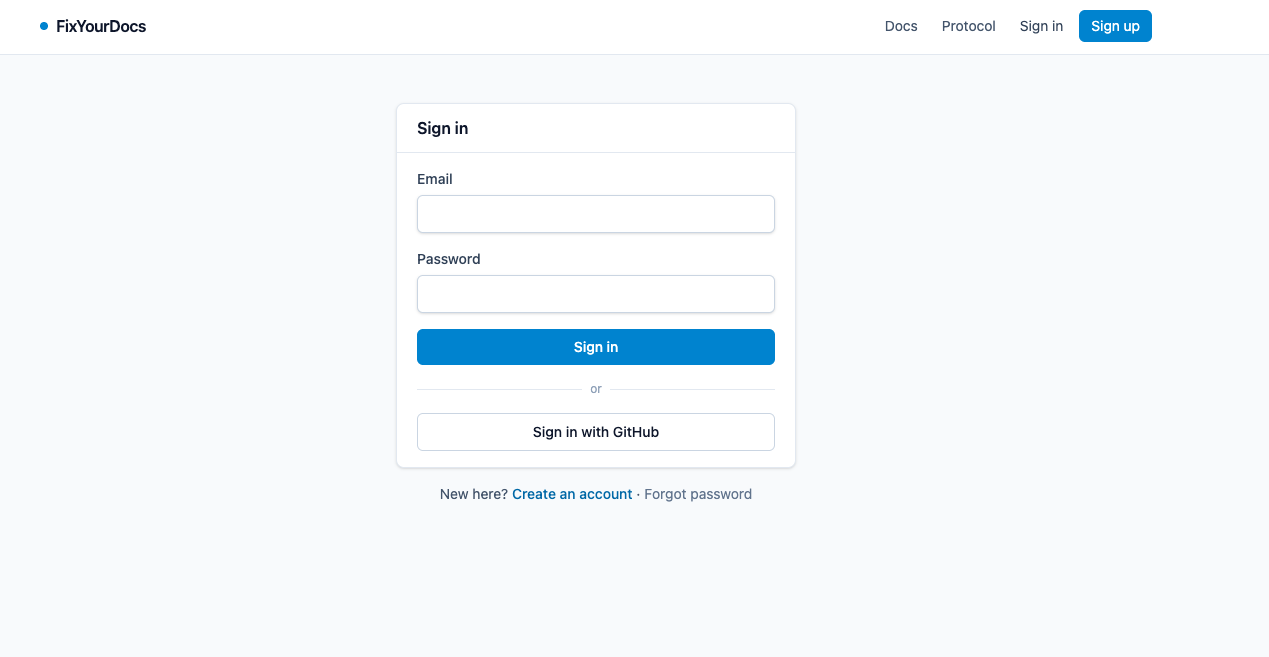
Sign in. Sign in with GitHub at fixyourdocs.io. The settings screen opens once you’re in.
-
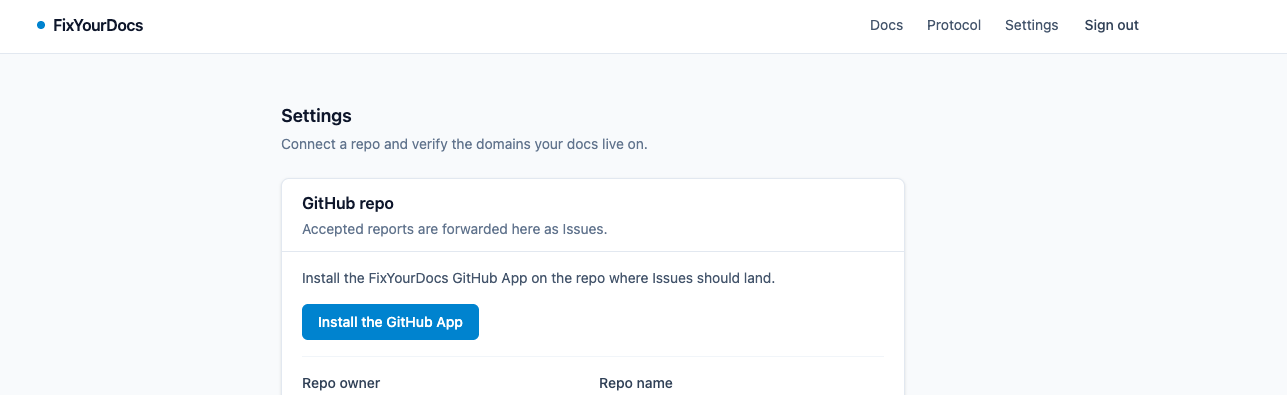
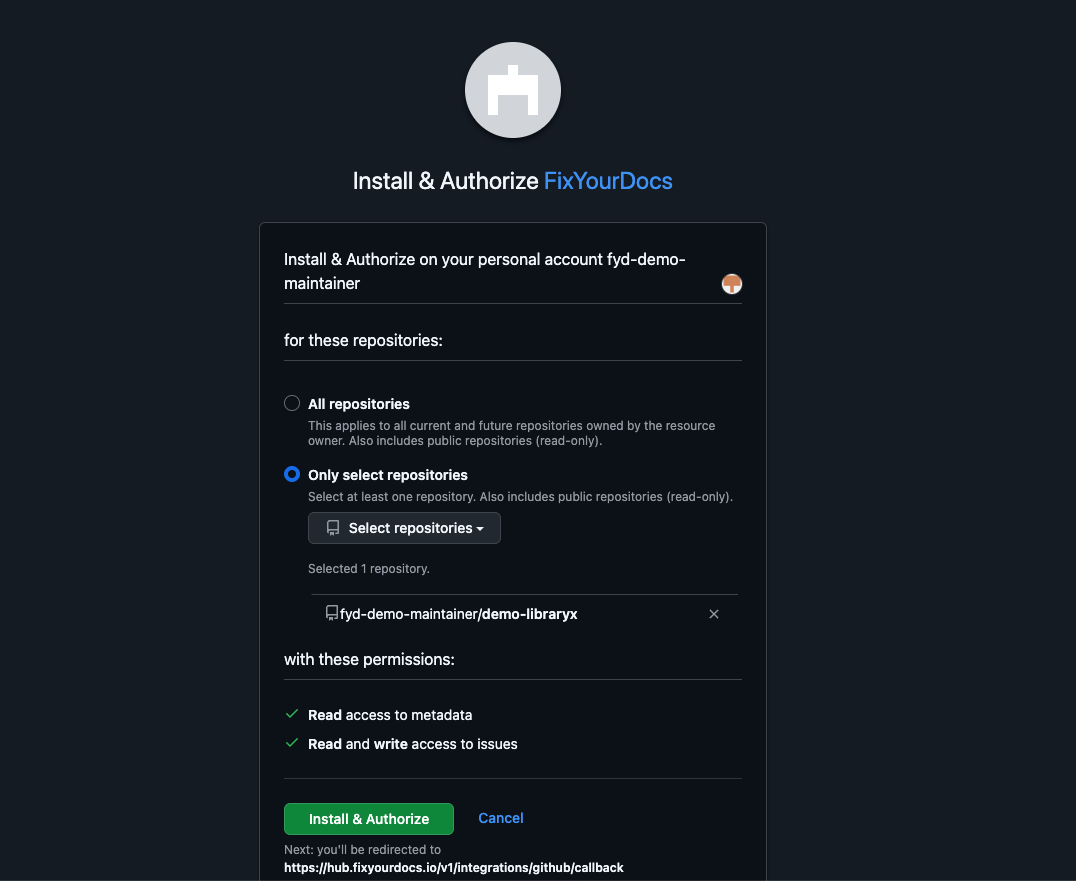
Install the GitHub App. From settings, start the install of the FixYourDocs GitHub App. GitHub asks which repo should receive Issues — pick it and grant access. You land back on the settings screen.
-
Point the integration at a repo. Choose the target repo and write the Issue body template. The template can reuse these fields (in single braces):
{summary},{details},{doc_url},{agent_name},{report_kind}. Forwarded Issues are titled[docs] <your summary>, and report text is sanitised before it’s filled in (no live@mentionsor#refs).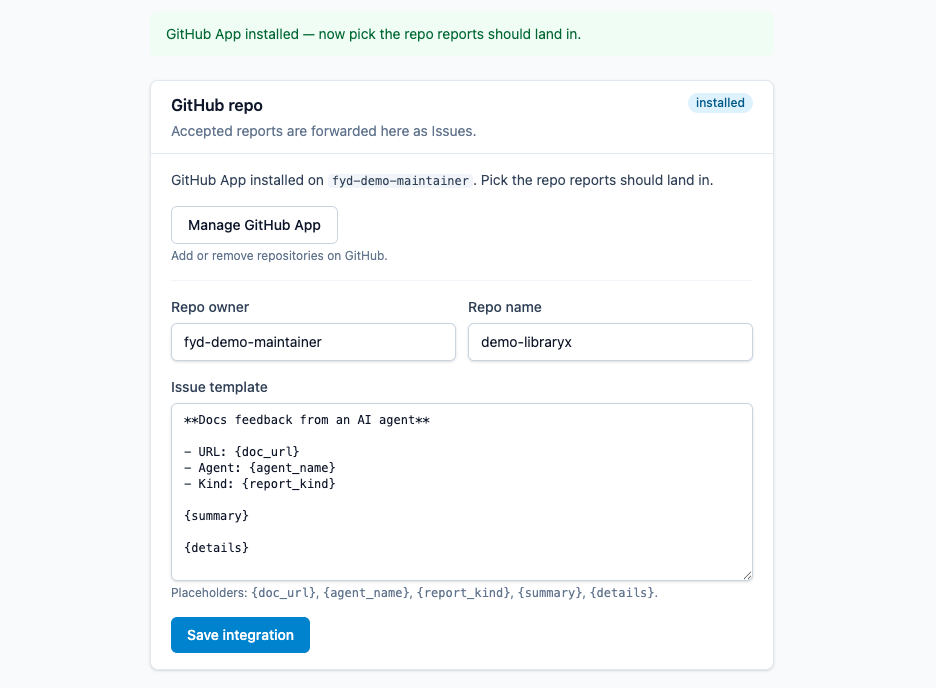
-
Choose how you’ll prove you own your docs. Reports only forward once the Hub confirms ownership, and how you prove it depends on where your docs are hosted. Do one of these:
- A custom domain (e.g.
docs.your-org.com) → publish a DNS TXT record. Continue with steps 5–7 below. - GitHub Pages (
<user>.github.io/…) → no DNS; claim the Pages URL through the App you just installed. Skip to Docs on GitHub Pages, then return here for the test report (step 8).
- A custom domain (e.g.
-
Claim the domain your docs live on. (Domain path.) Enter the domain your docs are served from (for example
docs.your-org.com). The settings screen then shows you a DNS TXT challenge record to publish.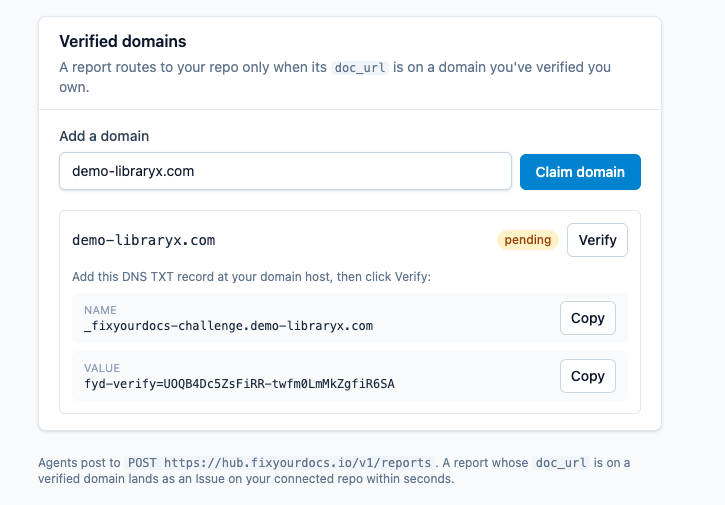
-
Publish the TXT record in your DNS, copying the name and value exactly as the settings screen shows them.
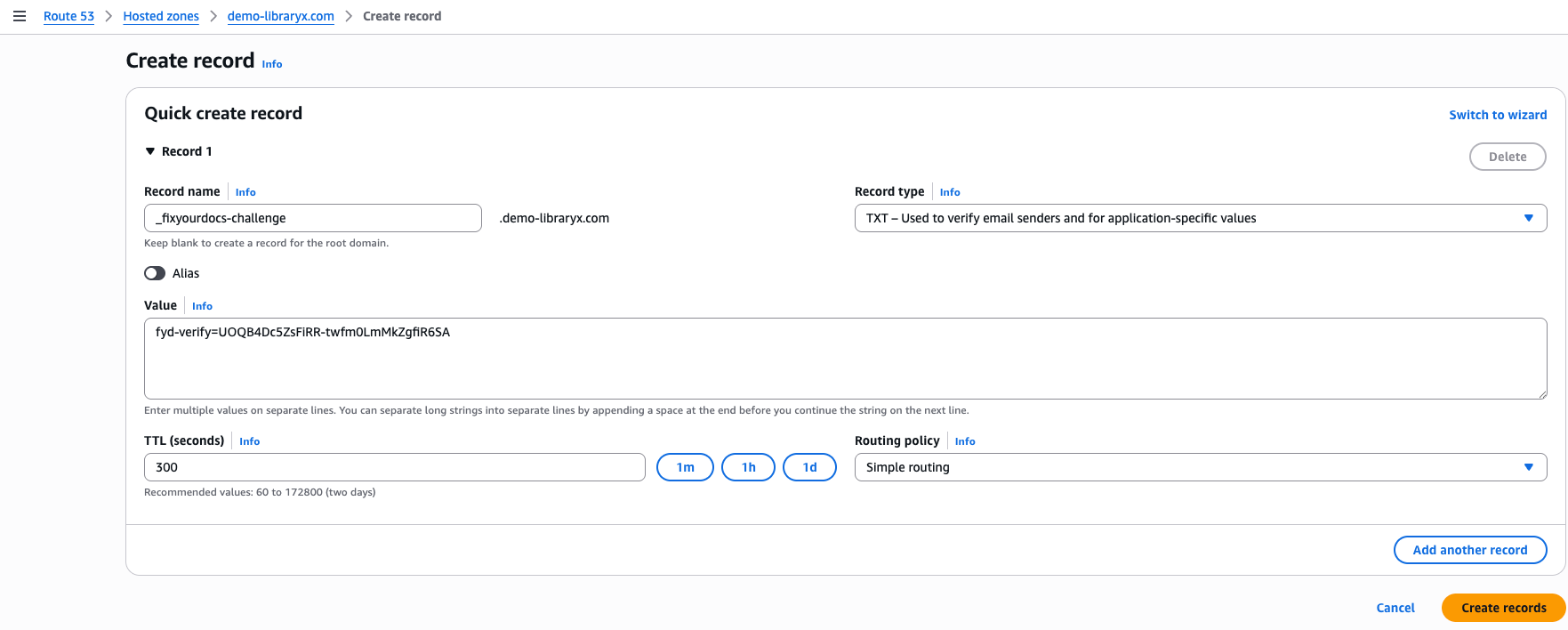
-
Verify. Once DNS has propagated, click Verify. On a match the domain flips to
verified. (DNS can take a few minutes — if it isn’t visible yet you’ll see a “still pending” hint; just try again shortly.)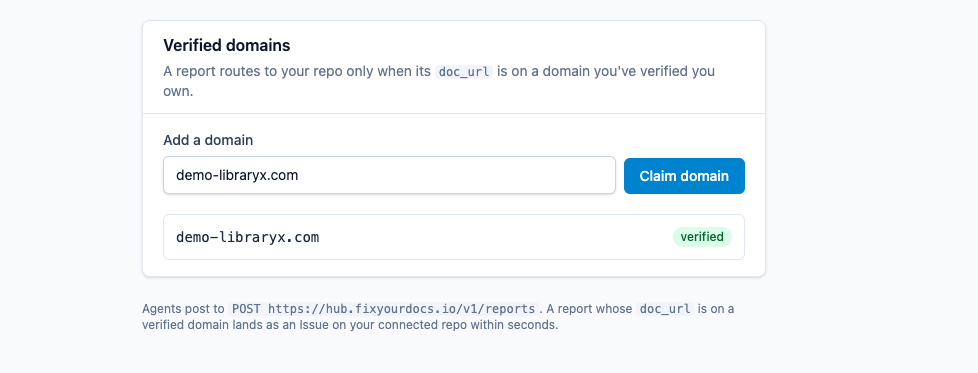
-
Send a test report. Confirm the whole path end-to-end by POSTing one report against a doc on your now-verified domain — swap in your own domain for
docs.your-org.com:Terminal window curl -X POST https://hub.fixyourdocs.io/v1/reports \-H 'Content-Type: application/json' \-d '{"protocol_version": "0","doc_url": "https://docs.your-org.com/","agent": { "name": "smoke-test" },"report": {"kind": "other","summary": "smoke test — ignore"}}'Within a moment a matching
[docs] smoke test — ignoreIssue appears in your configured repo — close it and you’re live.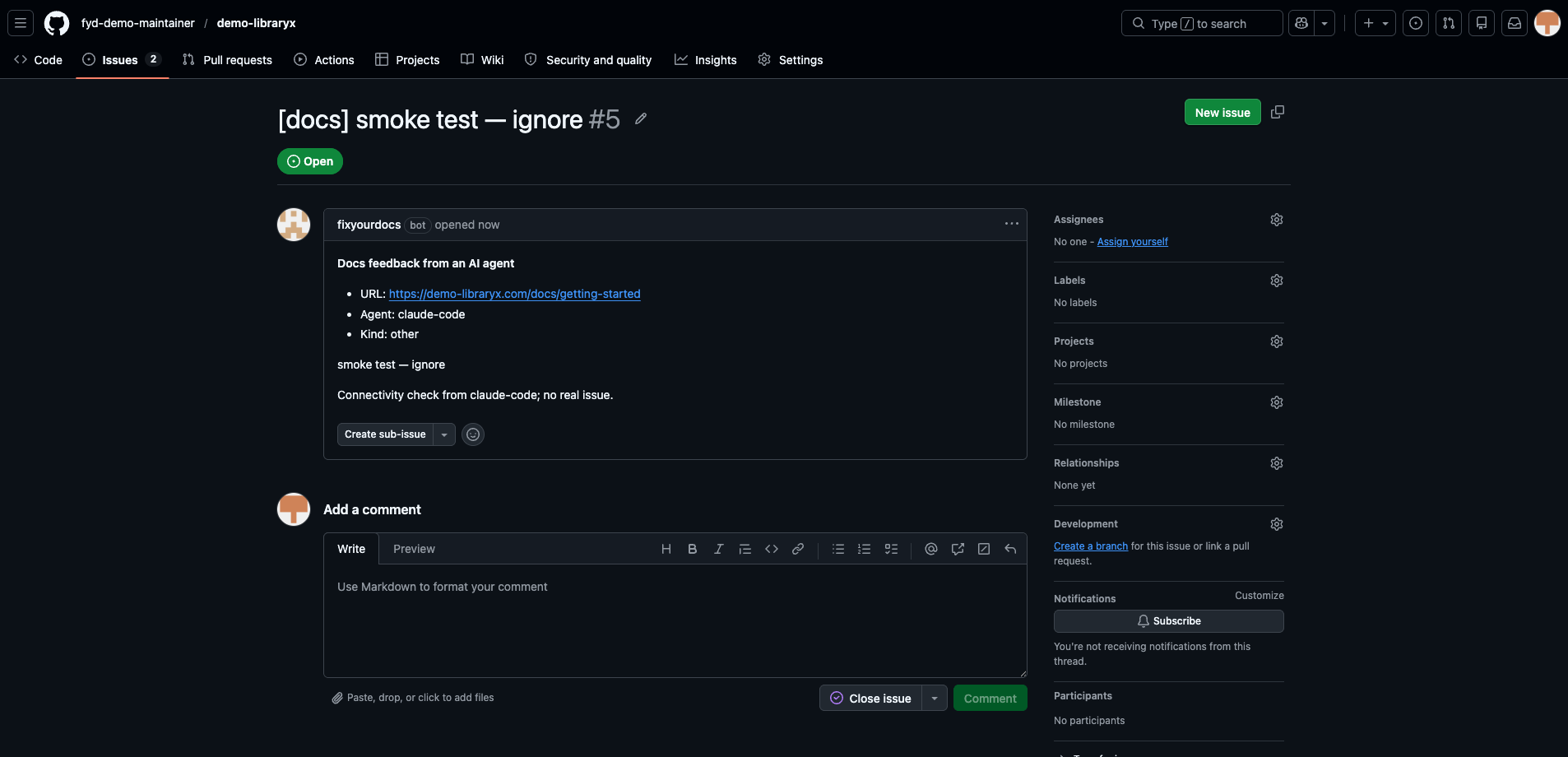
That’s it. From then on, any report whose doc_url is on
docs.your-org.com (or a subdomain of a verified registrable domain) is
forwarded to your repo as a GitHub Issue.
Docs on GitHub Pages
Section titled “Docs on GitHub Pages”This is the GitHub Pages path from step 4 above — the alternative to the
DNS domain claim. If your docs are served from a GitHub Pages site
(https://<user>.github.io/<repo>/…) there’s no DNS zone to add a TXT record
to — github.io is a public suffix the Hub won’t let anyone claim. Verify
the repo that publishes the site instead, using the GitHub App you
already installed — no DNS step:
-
Connect the publishing repo. Point your GitHub integration at the repo that publishes the Pages site (steps 2–3 above). Saving it proves the App can write that repo.
-
Claim the Pages URL. In the GitHub Pages section of settings, paste the URL your docs are served from and claim it:
- a project site
https://<user>.github.io/<repo>/is published by<user>/<repo>; - a user/org site
https://<user>.github.io/is published by<user>/<user>.github.io.
It verifies immediately — as long as the site’s publishing repo is the repo your integration is configured for. (Publishing from a different repo than your forward target isn’t supported yet; configure that repo first.)
- a project site
With the Pages site claimed, head back to step 8 above to send a test report and confirm the path end-to-end.
From then on, any report whose doc_url is under that Pages path forwards to
your repo as a GitHub Issue, exactly like a verified domain. The longest
claimed path wins, so /<repo>/ routes independently of any other project’s
Pages site under the same <user>.github.io.
Checking your setup
Section titled “Checking your setup”The settings screen always shows a snapshot of where you stand: your integration status (installed / configured, and the target repo) and your domains, with the DNS challenge still visible for any that are pending.
Found something wrong, missing, or out of date on this page? File a docs-feedback report →